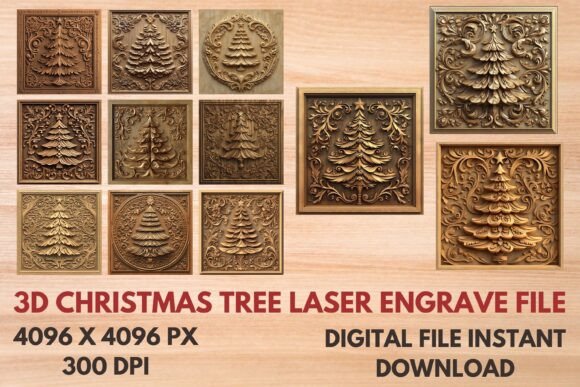
3D Christmas Tree Laser Engrave File for Creative Projects
The 3D Christmas Tree Laser Engrave File is a versatile digital design that brings festive charm to laser engraving projects. With its intricate, layered visuals and crisp details, this file offers an eye-catching way to incorporate holiday spirit into your creations. Whether you're designing custom home decor, crafting personalized gifts, or adding seasonal flair to commercial products, these 3D engravable files deliver a professional finish with minimal effort.
Elegant Design for Multiple Industries
This collection features high-resolution PNG and SVG formats, ideal for both beginners and seasoned professionals. The transparent background ensures seamless integration on any surface, while the non-editable nature of the design maintains its artistic integrity. Each file is optimized for laser cutting and engraving, making it perfect for wood, acrylic, metal, and other materials commonly used in creative and commercial applications.
With 12 unique designs included—both colored and black-and-white—you can easily adapt the look to match your project's theme or brand identity. The high 4096x4096 resolution at 300dpi guarantees clean lines and sharp edges, even when scaled down for small items like keychains or jewelry boxes.
Applications Across Creative Fields
These 3D Christmas Tree Laser Engrave Files are not limited to one industry. Here’s how they can be applied:
- Home Decor: Use them on wooden signs, candle holders, or wall art to create a warm, inviting holiday ambiance.
- Stationery & Textile Design: Engraved onto greeting cards, fabric tags, or gift wrap labels, they add a premium touch to your stationery line or textile prints.
- Tableware & Packaging: Incorporate them into mugs, coasters, or product packaging for a stylish and cohesive holiday presentation.
- Prints & Apparel: These designs work well as patterns for t-shirts, tote bags, or fashion accessories, especially during the festive season.
Because the file is scalable but not editable, it's important to plan your sizing carefully. For best results, always test the design on a sample material before mass production. This ensures alignment with your intended visual impact and technical requirements.
Design Assets That Elevate Brand Identity
Incorporating the 3D Christmas Tree Laser Engrave File into your design workflow can significantly enhance the aesthetic value of your products. The depth and texture of the 3D effect make it stand out from traditional flat designs, allowing you to offer something truly special to your customers.
From a branding perspective, using consistent, high-quality design assets like these helps build professionalism and recognition. A stylized 3D tree motif can become a signature element in your seasonal campaigns, reinforcing your brand’s commitment to quality and creativity.
For example, a boutique selling handmade wooden ornaments might use these files to engrave custom designs onto each piece. The result? A curated collection that feels personal yet polished, which can boost customer engagement and encourage repeat purchases.
Choosing the Right File Format for Your Project
When selecting between PNG and SVG files, consider the needs of your equipment and the final output. SVG files are vector-based, which means they retain clarity at any size—perfect for laser machines that require precise cuts. PNG files, on the other hand, are great for printing on textiles or promotional items where pixel accuracy is essential.
Here’s a quick breakdown of what you get:
- 12 Coloring PNG (4096X4096 @ 300dpi)
- 12 Coloring SVG
- 12 Black & White PNG (4096X4096 @ 300dpi)
- 12 Black & White SVG
Having both color and monochrome versions gives you flexibility across different mediums and allows you to choose the right tone depending on your project's purpose. For instance, a minimalist coffee mug may benefit from the black-and-white version, while a vibrant holiday-themed sign could showcase the full-color design beautifully.
Maximizing Readability and Visual Hierarchy
While this file isn’t a font per se, it functions similarly in terms of visual hierarchy. The layered structure of the 3D tree naturally draws attention, making it an excellent focal point in any design. When placed strategically, it can guide the viewer’s eye toward key elements such as logos, product names, or taglines.
Consider how the design interacts with text. If you’re pairing it with a modern sans-serif typeface, the geometric contrast can create a balanced yet dynamic composition. Conversely, a serif or script font might complement the organic feel of the tree, enhancing the overall warmth and elegance of the design.
Always test the placement of the engrave file alongside your chosen fonts. You want to ensure there’s enough white space and that the design doesn’t overwhelm the message you're trying to convey. In editorial design, for example, the tree could serve as a decorative header without distracting from the content below.
Practical Tips for Using 3D Laser Engrave Files
To get the most out of your 3D Christmas Tree Laser Engrave File, here are some practical steps to follow:
- Assess Material Compatibility: Make sure your laser machine supports the material you plan to use. Wood, acrylic, and leather are common choices that highlight the 3D effect well.
- Test Sizing and Positioning: Resize the design to fit your product dimensions and run a test engrave to check depth and alignment.
- Review Included Styles: The package includes multiple variations. Choose the one that best aligns with your brand or event theme.
- Pair Thoughtfully: Match the design with complementary colors, fonts, or textures to maintain visual harmony across your project.
One thing to note is that since these files are not editable, you won't be able to alter the tree’s shape or style. However, this also ensures consistency and reliability—two crucial factors in commercial design. As long as you resize appropriately and place it correctly, you’ll have a ready-to-use asset that looks professionally crafted every time.
Commercial Licensing and Usage Rights
As a digital buyer, it's important to understand licensing boundaries. The 3D Christmas Tree Laser Engrave File is a commercial asset, meaning it can be used in business-related projects. However, redistribution of the original file is typically prohibited unless explicitly stated in the license agreement.
If you're planning to use these designs in print-on-demand services or retail packaging, confirm that the seller provides the necessary rights for those specific uses. Most creators allow for resale of finished products as long as the original file remains intact and unmodified.
Real-World Examples and Creative Inspiration
Imagine a small business owner running a holiday-themed store. They could use these files to create engraved wooden tags for their handmade candles, giving each item a personal and luxurious feel. Or picture a graphic designer working on a client's social media campaign—overlaying the tree design on a banner adds a subtle festive touch without overwhelming the layout.
Another idea is to use the 3D tree as part of a larger pattern in textile design. Repeat it across fabric swatches for cozy throws or holiday apparel. The transparent background makes it easy to blend with other graphics or solid-colored bases, ensuring the design adapts smoothly to various substrates.
For marketers, these files can be embedded in email templates or printed on promotional merchandise like pens, mugs, or calendars. Their visual appeal increases memorability, helping your holiday promotions stand out in a crowded market.
Why This Design Stands Out
What sets the 3D Christmas Tree Laser Engrave File apart is its ability to evoke emotion through form. Unlike basic outline trees, the layered, dimensional look suggests craftsmanship and care. It’s not just a symbol—it’s an experience.
Whether you're creating a luxury product line or a budget-friendly craft collection, this design can bridge the gap between affordability and sophistication. Its universal appeal makes it suitable for a wide audience, from families looking for personalized decorations to businesses aiming to refresh their seasonal offerings.
Moreover, the inclusion of both color and black-and-white options gives designers more room to experiment with different aesthetics. You can pair the colorful version with muted tones for contrast, or let the black-and-white design shine on bold red or green backgrounds—classic holiday hues that resonate with many consumers.
Getting Started with Your New Design Asset
Once purchased, you'll receive a zip file containing all the design assets. Extract the contents and open them in your preferred design software or directly import them into your laser engraving program. Because they come in standard formats, compatibility should be straightforward.
Here are a few things to keep in mind when beginning your project:
- Use the coloring PNG/SVG if you want to preserve the festive palette.
- Opt for black-and-white versions when working with metallic or dark materials.
- Ensure proper scaling to avoid distortion, especially on smaller items.
- Always review the file on screen before sending it to the laser cutter.
By integrating these files into your creative toolkit, you can streamline your workflow and elevate the visual quality of your seasonal products. The key is to use them thoughtfully, ensuring they enhance rather than overshadow the rest of your design.
Thanks for shopping with us. We hope these 3D Christmas Tree Laser Engrave Files inspire your next project and help you deliver something memorable to your audience this holiday season.